WELCOME
AI IN EDUCATIONWORKSHOP & PROJECT HUB
LIVE LEARNING EXPERIENCE
AI in Education
Workshop Schedule
A focused day of practical AI learning, emerging educational technology, expert perspectives, and meaningful conversation.
WORKSHOP PART I
AI Foundations: What AI Is and Why It Matters
A clear, educator-friendly introduction to artificial intelligence and generative AI.Dr. Seyma Bozkurt Uzan Workshop LeadBREAK
Coffee & Refreshment Break
Take a short break, refresh, and reconnect before the hands-on session.WORKSHOP PART II
AI in Action: Using Today’s Most Popular AI Tools
Practical demonstrations and classroom applications that help educators choose and use AI tools effectively.Dr. Seyma Bozkurt Uzan Workshop LeadSPECIAL GUEST SESSION
Perspectives on AI, Education, and the Future of Learning
Strategic and historical perspectives on how artificial intelligence is reshaping education.Dr. Robert Voss Associate Professor of History · Faculty Senate President · Social Science Education Coordinator · M.S.Ed. Teaching History DirectorCLOSING REMARKS
Closing Reflections and Future Directions
Bringing the day’s ideas together and looking toward future educational innovation.Prof. Dilhan Kalyon Charles V. Schaefer, Jr. School of Engineering and Science · Department of Chemical Engineering and Materials ScienceTRANSITION
Short Break
Transition to lunch and networking.LUNCH & NETWORKING
Continue the Conversation
Connect with speakers and participants, exchange ideas, and explore opportunities for collaboration.PLAN YOUR VISIT
Workshop Location
& Parking
The workshop will take place in the McLean Building. Please plan a few extra minutes for parking and walking to the conference room.
Open Stevens campus map ↗WORKSHOP VENUE
McLean Building
Conference Room 510
VISITOR PARKING
River Lot or Babbio Garage
Visitors may use either of these two designated parking areas.
STEVENSDaily Parking PermitVISITOR · AUGUST 5, 2026
BABBIO / RIVER
BABBIO / RIVER
REQUIRED BEFORE ARRIVAL
Print your visitor parking permit.
Download and print the attached permit before coming to campus. Bring the printed copy and display it visibly in your vehicle while parked.
Download parking permit (PDF) ↓01 — START HERE
So, what is AI?
Artificial intelligence is technology that performs tasks we associate with human intelligence—by finding patterns in data.
AI is a computer system that can learn patterns, then use those patterns to predict, decide, or create.
DATA→PATTERNS→OUTPUT
Traditional software
People write explicit rules.
IF rain → take umbrellaMachine learning
The system learns patterns from examples.
EXAMPLES → learned patternQUICK THINK
AI or just automation?
Tap a card, make your choice, then reveal the idea.
02 — HOW WE GOT HERE
From rules to generation.
AI did not appear overnight. Select a milestone to follow the ideas that led to today’s generative tools.
1950
MILESTONE 01
Can machines think?
Alan Turing proposes a practical test for machine intelligence.Earlier AIClassifies & predicts“Is this email spam?”
→
Generative AICreates new content“Draft a clearer email.”
03 — LOOK INSIDE
Generative AI is a
pattern machine.
It does not “know” in the human sense. It predicts a likely next piece—called a token—again and again.
- 1You give it a promptInstructions and context shape the task.
- 2The model predictsIt uses patterns learned from large datasets.
- 3You review the outputA human checks, improves, and verifies it.
Slide to make the prompt more useful.
VagueSpecific
YOUR PROMPT
Explain generative AI to students.
Prompt strengthA start
A strong prompt = task + context + format + constraints
04 — THE TOOLKIT
Choose by purpose,
not by hype.
No tool is “best” at everything. Start with the task, then select a suitable tool.
05 — AI IN THE CLASSROOM
One goal.
Two age groups.
Choose a teaching level to see a practical classroom example and a focused toolkit. AI should support student thinking—not replace it.
CLASSROOM EXAMPLE
SCIENCE • 45 MIN
Design a habitat for an endangered animal
EXPLORE
Start with trusted sources
The teacher loads short, age-appropriate sources into NotebookLM and prepares a source-grounded overview.
QUESTION
Practice critical thinking
Students compare an AI-generated habitat suggestion with the supplied sources and highlight two supported facts and one claim to verify.
CREATE
Show human understanding
Teams build a habitat poster in Canva Education and add a note explaining which choices were theirs and where AI helped.
BEST-FIT TOOLKIT
Keep it guided and visual.
Canva Education
Create posters, comics, infographics, and visual explanations.
Khanmigo
Guide practice with a tutoring approach rather than simply giving answers.
NotebookLM
Ground explanations and study materials in sources selected by the teacher.
Gemini for Education
Help teachers plan, differentiate, and create classroom materials.
ChatGPT
Use teacher-led demonstrations to model prompting and fact-checking.
!
Before students use any AI tool
Check your school’s approved-tool list, privacy rules, account requirements, and current age/consent terms. For students under 13, use adult-led demonstrations unless your institution provides an age-appropriate managed service.
AI + HOLOGRAPHIC LEARNING
Bring AI off the screen
and into the room.
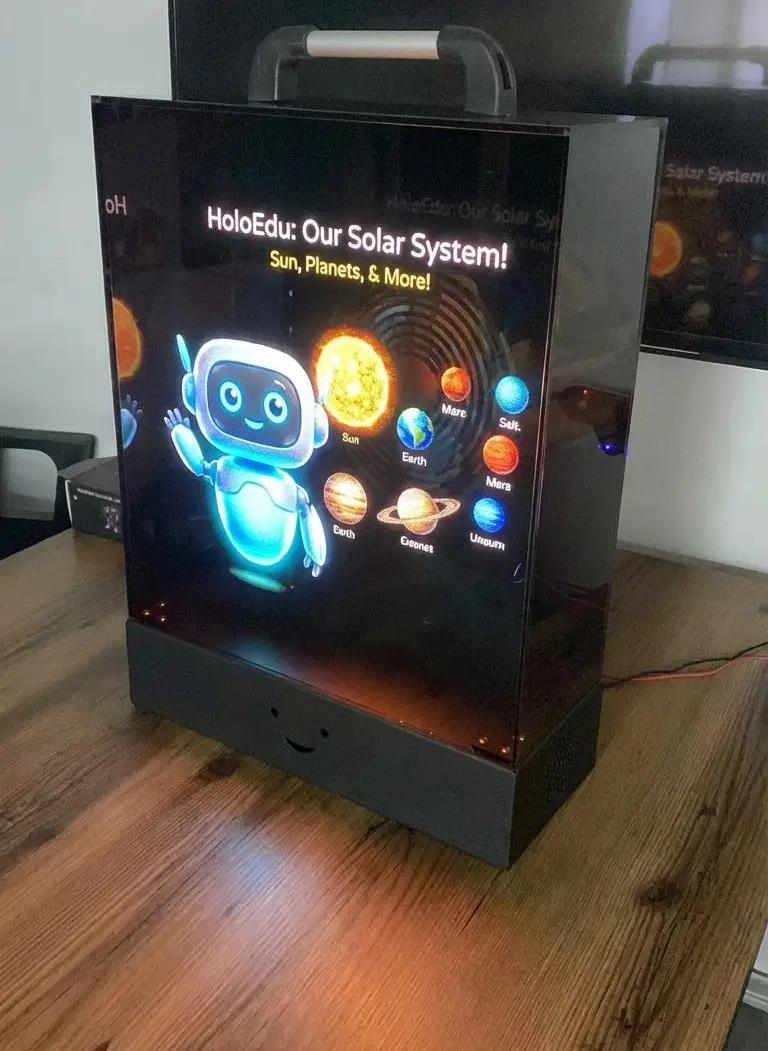
HoloEdu is teacher-governed AI that turns lessons into shared 3D classroom experiences.
THE CLASSROOM OPPORTUNITY
AI should be visible,
social, and teacher-led.
Move beyond isolation
Replace one learner–one screen interaction with a shared object that supports joint attention and peer talk.
Make concepts present
Turn abstract ideas into spatial visuals students can observe, question, compare, and explain together.
Keep teachers in control
Place teacher approval between AI generation and anything that reaches the classroom.
A TEACHER-GOVERNED WORKFLOW
AI creates.
The teacher decides.
HoloEdu keeps the teacher in the loop, then brings the approved result into the room as a shared learning object.
Teacher prompt
Define the concept and learning purpose.
AI visual producer
Generate a classroom-ready 3D scene.
Teacher approval
Review, revise, and authorize the content.
Holographic display
Explore the concept together in class.
FROM LESSON TO SHARED EXPERIENCE
A concept students
can gather around.
- 1See the concept
Abstract ideas become spatial, visual, and memorable.
- 2Discuss together
Students compare, ask, explain, and challenge ideas around one focal object.
- 3Extend after class
Lesson content and interaction data can flow back into the LMS for review.
BUILT FOR CLASSROOM DEPLOYMENT
More than a demonstration.
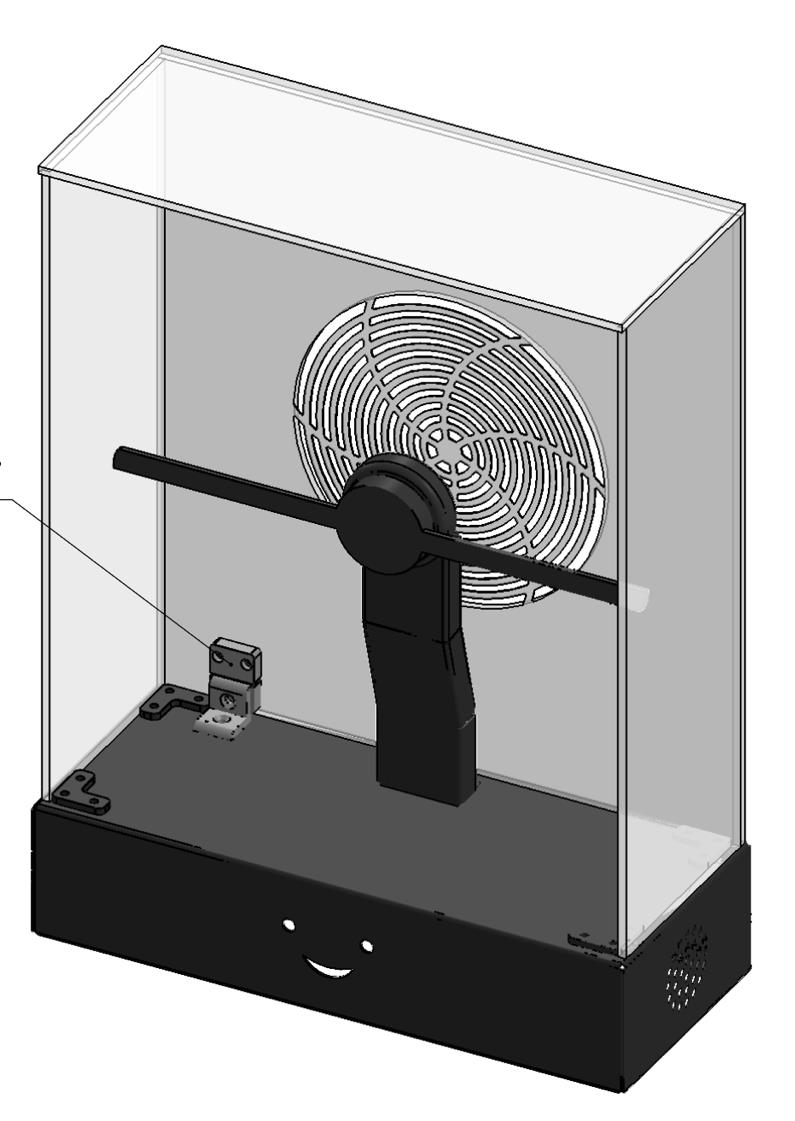
Portable enclosure
A box-shaped transparent body protects the rotating fan while preserving frontal visibility.
Acoustic & airflow strategy
Rear ventilation supports cooling and directs noise away from the student-facing area.
Safety-first operation
A magnetic safety switch can shut down the fan when the enclosure is lifted or displaced.
LMS-ready architecture
The teacher interface, cloud AI services, and local device connect through a hybrid workflow.
U.S. patent application filed
THE NEXT STEP IS EVIDENCE
Help test whether shared AI changes learning.
HoloEdu is designed to support a proposed study comparing conventional instruction, screen-based AI, and shared holographic AI.
FOR TEACHERS & SCHOOL LEADERS
See what your lesson could become.
Explore a teacher-led demonstration or discuss a future school pilot with the HoloEdu project team.
06 — USE AI WISELY
Powerful tools.
Human responsibility.
Verify
Check important claims against reliable, independent sources.
Protect
Do not enter personal, confidential, or sensitive information.
Disclose
Be transparent about when and how AI supported your work.
Take ownership
You remain responsible for the final result and its effects.
07 — FINAL CHALLENGE
Ready to test your AI instincts?
Choose one answer for each question. Feedback appears immediately.
1You need a cited starting point for current web research. Which tool type fits best?
2An AI gives a confident statistic with no reliable source. What should you do?
3Which prompt gives the AI the clearest direction?